
Asiden
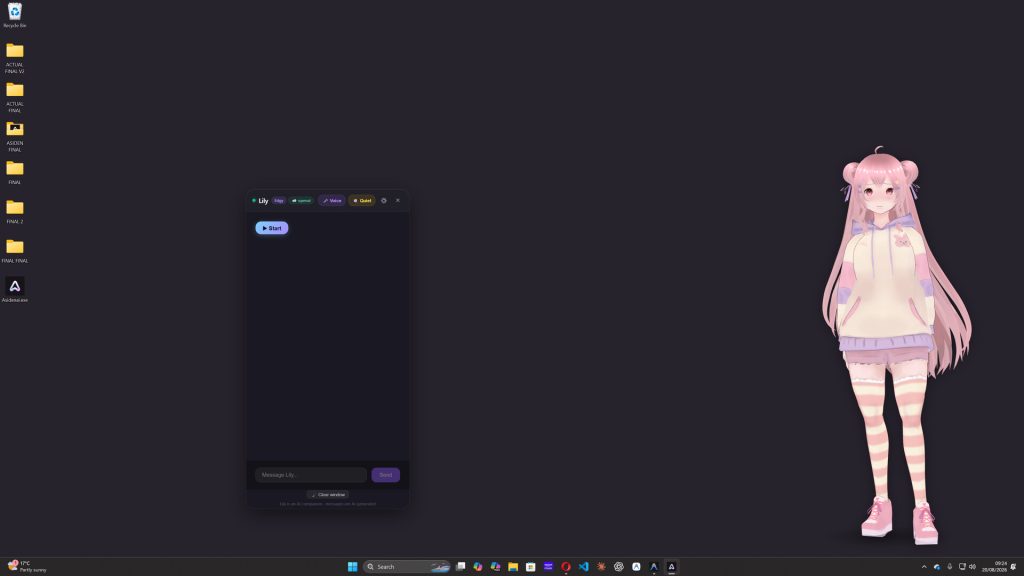
Asiden is an AI companion application for Windows desktops. Rather than operating from a browser tab, the companion appears directly on the desktop as a 3D VRM avatar without a boxed window. Users can pick from the included companions or build their own, and the software separates the companion into three parts: a Body (the avatar, which can be adjusted or replaced with an imported compatible VRM model), a Soul (the personality, which can be one of the included options or a custom creation) and a Memory that records the user’s interests, the people in their life and past conversations, then references them later. Chat, screen vision, speech, memory and the safety layer all run on the user’s own hardware, and the core local features continue to work when Steam is in Offline Mode. No separate Asiden account is needed for local use, and local conversations, memories and screen captures remain on the PC. Optional cloud models and voices are available through a separate subscription, require an Internet connection and send only the context needed for a given request.
Users can adjust how present the companion is through several settings. Proactivity ranges from replying only when addressed to starting conversations regularly, with a Quiet Mode that prevents the companion from initiating. Reply length, screen awareness frequency and the spontaneity of responses can also be tuned. Screen awareness can be switched off entirely, set to occasional glances or to frequent observation, and users can draw a box around a specific part of the screen to direct the companion’s attention to an error message, a section of a game or other content. The companion may also check in if the user has stayed on the same task for a while. For gaming, Asiden can recognise supported games and use downloadable knowledge packs, stored locally, to discuss their characters, mechanics and terminology.
The companion speaks using local voice generation, with mouth and facial expressions synchronised to speech, and accepts input by microphone or keyboard; local speech recognition works offline. A Pause function halts proactive activity, screen awareness, microphone input, replies and speech together, while screen vision and microphone input can also be disabled individually. A safety layer sits outside every personality and cannot be overridden by a character: it blocks explicit sexual content and steps out of character to direct users towards appropriate help if they appear to be in serious distress. A local image-safety check runs before any image is sent through the optional cloud vision service.
Steam data
Synced 2 days agoReviews
No user reviews