Desktop Gremlins
MEET THE LITTLE MENACE LIVING ON YOUR DESKTOP
Desktop Gremlins is a living desktop companion that stays right on your screen. It wanders between your windows, reacts to music and the applications you open, asks for attention, gets tired, falls asleep-and definitely notices when you forget to feed it.
Give your gremlin a name, feed it, pet it, pick it up or offer it a cup of coffee. You can also choose exactly where it is allowed to walk, so it stays out of the way while you work, draw, study, play or stream.
CARE FOR IT. WATCH IT EVOLVE.
Your companion has hunger, affection, energy and experience. Everyday interactions help it grow from a tiny slime through five distinct forms, each with its own appearance, animations, reactions and personality.
-
Feed, pet, grab and play with your companion
-
Watch it react to music and popular applications
-
Rename it and define a custom invisible walking zone
-
Control actions with global hotkeys, mouse buttons, gamepads and macro devices
-
Discover new moods, animations and dialogue as it changes
LET YOUR VIEWERS JOIN THE CHAOS
Connect Twitch and turn Channel Points into real interactions on your stream. Viewers can feed or pet the gremlin, give it coffee, send on-screen messages, trigger character reactions or unleash visual effects.
You remain in control: select up to 25 rewards, set their prices, adjust effect duration and customize alerts. Redemptions enter a queue instead of activating all at once, keeping busy streams entertaining without turning them into a slideshow.
-
Custom alerts with viewer names, avatars and emotes
-
Moderated on-screen messages with unsafe words automatically masked
-
Streamer Mode for hiding private account and connection information
-
OBS Browser Source support for effects above full-screen Game Capture
-
Every reward and notification can be enabled or disabled separately
CHAOS—ONLY WHEN YOU ALLOW IT
Enable Chaos Mode and your gremlin may shake or move windows, play with the cursor, flash the taskbar and launch harmless desktop pranks. It can be mischievous, but it never closes your applications, and every disruptive feature is optional.
Prefer a peaceful companion? Leave Chaos Mode disabled. The gremlin will still live on your desktop, react to what you do and keep you company without rearranging your day.
MAKE YOUR GREMLIN YOURS
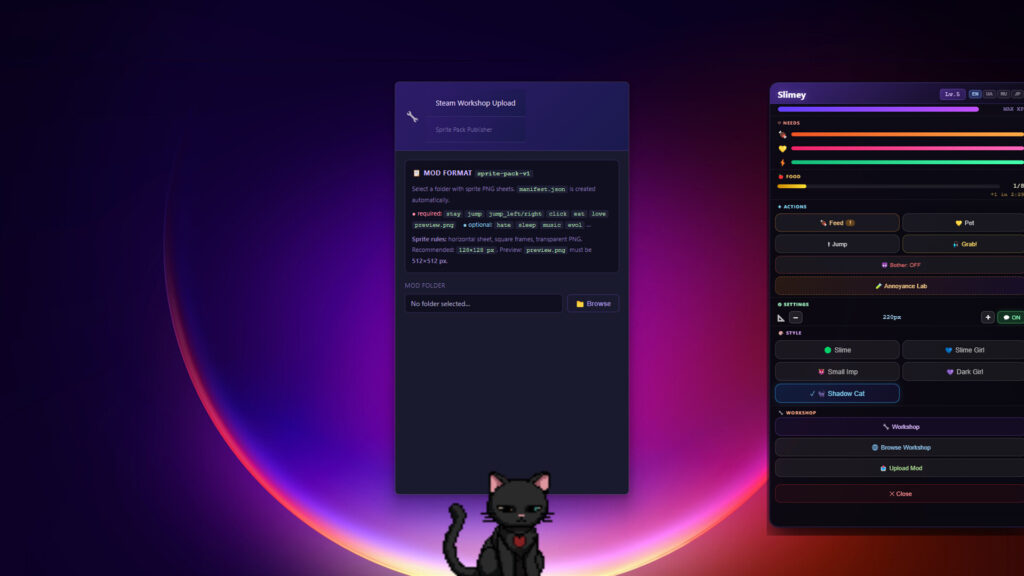
Subscribe to community-made sprite packs through Steam Workshop, or use the built-in validation and upload tools to publish a complete character pack of your own.
-
Transparent, always-on-top desktop companion
-
Five evolving forms with unique animations and personalities
-
Needs, moods, stamina, sleep and experience systems
-
Reactions to music and the applications you use
-
Twitch Channel Points integration and customizable stream alerts
-
Optional Chaos Mode with configurable desktop pranks
-
Custom walking zones and flexible global controls
-
Steam Workshop support for community sprite packs
-
English, Ukrainian, Russian, Japanese, Polish and Italian
YOUR DESKTOP. YOUR GREMLIN. YOUR RULES.
It only wants a little food, a little affection-and perhaps complete control of your desktop. What could possibly go wrong?
Steam data
Synced 2 days agoReviews
9 user reviews
Achievements
8
Unlockable on Steam
Latest from the developer
- Laura_mif has joined Desktop Gremlins! ud83eudd8a
- Meet Nisemom, with more co-op reactions and conversation! ud83cudf80
- Meet Vin[s]Vas in Desktop Gremlins!
- Bug Fixes & AI Improvements Patch
- Akita, Coins, and More Personality!
- Meet Plurrentia: more bubbles, more cozy company! ud83eudee7
- ud83eudd8a Welcome xdongin to Desktop Gremlins!
- Meet Myrreska our first streamer gremlin! ud83dudc9c
- fix fps Patch
- Desktop Gremlins is here!
Announcements posted by the developer on Steam.